
ELK(Elastic, Logstash and Kibana) and Filebeat Stack with Dockers
In the Application Operations world, with huge infrastructure estate & multi tenant applications. Log analysis is not a easy task. During any major issues it is always important to review analyse and interpret the logs. It's never an easy task to perform with a ssh console. Centralised logging will help to provide visibility of the health & performance of the application, enabling the operation team to easily drill down to issues. What should we expect from a open search and analytics engine tool, Collection of data Centralise and…

Swagger Installation
For overview of Swagger tools refer Swagger - OpenAPI Specification (OAS) Installing Swagger UI - Docker Pull the docker image - docker pull swaggerapi/swagger-ui Run the docker image - docker run -p 80:8080 swaggerapi/swagger-ui Customisation : To the above command lets add some customisation, BASE_URL : To customise the URL to specific keywords. SWAGGER_JSON : Specify your json files generated from the editor. docker run -p 8080:8080 -e BASE_URL=/swaggerUI -e SWAGGER_JSON=/apispecs/swagger.json -v /apispecs:/apispecs swaggerapi/swagger-ui …

Spinning up docker containers with shell Script.
Scenario : Spinning up containers with dependency on each other in a sequence. Startup of docker containers using shell script. Verification if the docker container is started. Option to Mount and unmount the containers. Execution: sh infra.sh -mount / -unmount / -remount Mount - to spin up the containers Unmount - Shoutdown the containers Remount - TODO For the latest update refer : GIT #/bin/bash #Purpose: # Startup of docker containers using shell script. # Verfification if the docker container is started. # Option to Mount and unmoun…
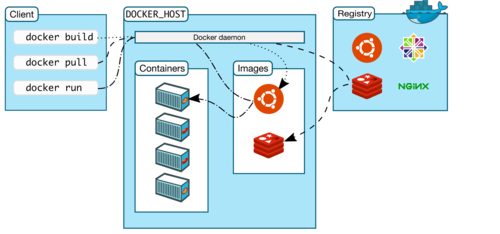
Basic Docker Terminology
In the below post I have tried to cover the basic terms which you will need to understand to start working with Docker. More information and reading refer to Docker Docs. Docker - The docker daemon process running on the host which manages images and containers. This is always referred to as Docker Engine. Container - Its a runtime instance of a docker image. Which consist of Docker image Execution environment Set of instructions Docker Hub - The Docker Hub is a centralized repository with Docker and its components. Which consist of, Docker i…

Basic Docker commands
In this post, I have tried to cover most of the basic commands which are required to start working with Docker. docker –version Get the currently installed version of docker docker pull Pull images from the docker repository(hub.docker.com) docker run Create a container from an image docker start docker stop docker ps list the running containers docker ps -a show all the running and exited containers docker images lists all the locally stored docker images docker rm used to delete a stopped container docker rmi used to delete an image from …

Install Docker on Ubuntu / Pop OS!
In this blog, will demonstrate how to install Docker on Ubuntu. Below is the small post from the official documentation provided by docker and from my experience. To read more on the same refer the official website at Docker Docs The current Docker Engine package is now called docker-ce. Older versions of Docker were called docker, docker.io, or docker-engine. If you really want to use docker for some complex build images I will recommend the below steps to be performed. If you want to try docker for some fun or basics then you can use the …

